


The tutor is an AI and it can be wrong. Check what it tells you, especially before you run a command on your server. When in doubt, this site and your teachers are the reference.

Architecture & Deployment
 A
Media Engineering
Course
A
Media Engineering
Course
On this page
Table of contents
Welcome to the Architecture & Deployment course!
In this course you will learn:
- How to deploy applications on a Linux server on an IaaS platform (Microsoft Azure).
- How to deploy applications on a PaaS platform (Render).
In pursuit of this goal, you will learn:
- How to use the command line and version control.
- The basics of Unix system administration and cloud computing architectures.
- Good security practices related to system administration and web applications.
This course is a Media Engineering web development course taught at HEIG-VD.
Getting started
All you need to start the course is a Unix command line:
- Linux and macOS users can use their standard Terminal.
- Windows users must install the Windows Subsystem for Linux (WSL) before the first session. Installing the WSL step by step walks through it, and starts with how to tell whether you already have it.
Following the course
This site follows the course as it happens. After each session, the cards at the top of this page are updated:
- Previously (green): what the last session covered.
- Due next (yellow): the exercises from the last session that you should finish before the next one.
- Next time (blue): what the next session will cover.
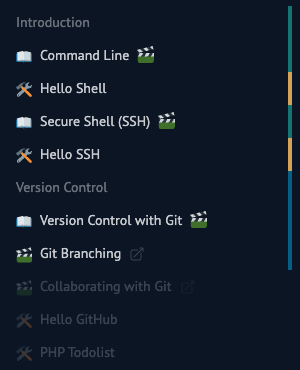
The sidebar uses the same colors as the cards: a bar on the right of each subject and exercise shows whether it has been covered, has work due or is coming next. Chapters the course has not reached yet are faded out. Exercise solutions appear within each exercise page once their chapter has been covered.
If this site is down
A backup copy of this site is available at backup.archidep.ch. It may lag a little behind this site, but it is enough to keep reading the material and working on the exercises if the main site is temporarily down.
An AI tutor
If you use an AI agent (Claude Code, Codex, Cursor, ChatGPT, etc.), remember that it can do any exercise of this course for you in a few minutes. But a finished exercise is not the goal: what you understand while you do it is. If the agent does the work, you learn nothing.
The ArchiDep tutor turns your agent into a tutor for this course. It knows the course material and how far the class has got. It asks what you tried, gives you the smallest useful hint, and lets you type the commands yourself. You can also ask it to go through an exercise with you. Its page explains how to install it.
Warning
PDFs
Each page (subject, slides, exercise) is downloadable as a PDF.
Warning
These PDFs are not final. They are not the reference material for this course. Course material will change until the end of the semester. The only up-to-date material is what is on this site.
Tools for later sessions
You will need these as the course goes on. Install them when the subject that uses them comes up; you do not need them for the first session.
- Git
- macOS users should install the command-line tools
- Windows users should install Git for Windows
- Linux users on Debian/Ubuntu-based systems can install Git with the
sudo apt install gitcommand, or with their other distributions’ package managers.
- A free GitHub account
- Google Chrome (recommended, any browser with developer tools will do)
- Firefox (optional, required for one network exercise)
- A free Render account
References
These are the main references used throughout this course. More detailed and additional links to various online articles and documentation can be found at the end of each subject.
- The Linux Documentation Project
- Building the Future of the Command Line
- SSH, The Secure Shell: The Definitive Guide - Daniel J. Barrett, Richard E. Silverman, Robert G. Byrnes
- The Git Book
- Open Web Application Security Project
- Ops School Curriculum
- The Internet Explained From First Principles
- The Twelve-Factor App
- Systemd Manual
- nginx documentation
- Render Documentation
Wikipedia is also often referenced, namely these and related articles:
- Secure Shell
- Cloud Computing
- Internet Protocol
- Domain Name System
- Environment Variable
- Reverse Proxy
- Public Key Certificate
Credits & thanks
- Simon Pinkas contributed the Docker subject, the original idea for the Hello Shell command line exercise and various other material. He used to teach parts of the course when I felt too lazy (his words), and to help students navigate through this mess along with me during exercise sessions.
- My
test subjectsearly adopters: students who helped test, debug and improve the course. - David Goetschmann, my current boss at Square Services, who encourages me to continue to teach this course.
- Daniel Rappo, director of the Media Engineering Institute, allowed me to work a lot more time than I was supposed to on the material for this course when developing the initial version while I was working there.
- Mathias Oberson, former colleague at MEI and Square Services, wrote the command line subject and various other material.
- Sarah Composto reread the material, suggested a significant amount of corrections and improvements, and hand-pixelated the funny logo.
- All my former colleagues at MEI who suggested various improvements.
- Nicolas Chabloz and the Helpdesk & IT team at HEIG-VD who helped me debug last-minute issues.
- All the teachers who taught me.
- All the students of the Media Engineering classes who participated in the course since 2019 and suggested various fixes and improvements.
- All the giants who built great things, whose shoulders I stand on.
- Douglas Adams, who taught us the meaning of life.
- My laptop, who is currently dying, but still compiles the course every day.
- My coffee machine, who never stopped supporting me, and provided all the raw material that was turned into code.
- All the people I undoubtedly forgot to mention (let me know).